 Dhancept
Trade Desk
The primary chart and manual booking terminal for tracking specific assets.
Interface Layout
- Left - Watchlist Panel: Quickly filter through watchlists, add new tickers (e.g.
RELIANCE.NS,AAPL), or remove inactive rows. Clicking a ticker immediately loads it into the main chart. - Center - Advanced Chart: Features an embedded candlestick canvas supported by TradingView. Change intervals (1D, 1W, 1M) and overlay common indicators like MACD or RSI.
- Bottom - Manual Trade Journal: Record a BUY or SELL order manually (shares and execution price). This updates your virtual ledger inside the Portfolio module.
- Right - Options Chain: Displays real options chains (strike prices, bids/asks, open interest, and implied volatility). Options are primarily loaded for liquid US equities.
Workspace View
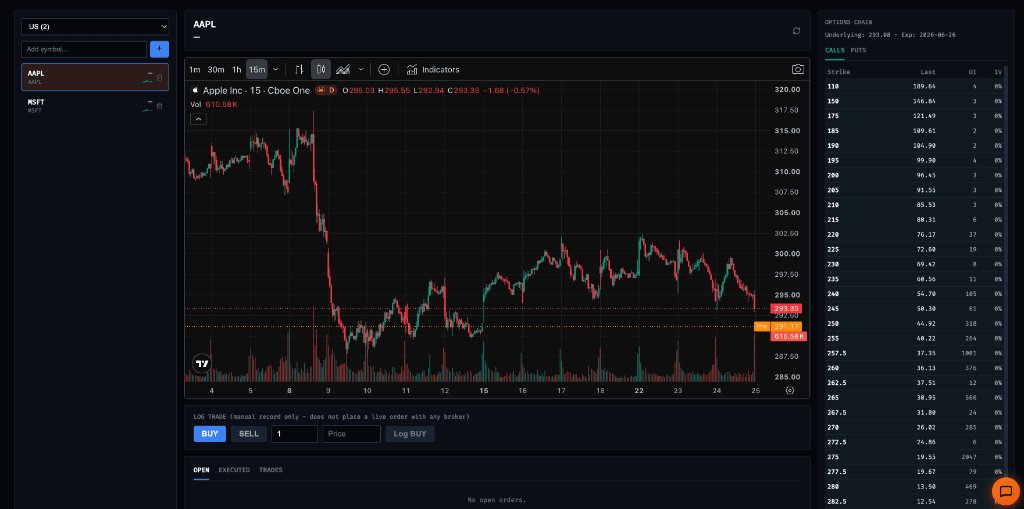
Trade Desk Interface showing the AAPL candlestick chart, Watchlist, and Options Chain.